Provider Services API
Architecture Diagram
Overview
The Provider Services connector uses two separately deployed applications in one API-led framework:
- Provider Services API (
provider-services-impl): the Process API for Salesforce request handling, composite reads and writes, DCR job orchestration, and status tracking. - OneKey System API (
onekey-sys-impl): the System API for OneKey connectivity, request transformation, field mapping, and schema validation.
The applications support two independently enabled processing paths. Search Before Create (SBC) uses synchronous API operations, while Data Change Request (DCR), also called Validation Request, uses scheduled jobs with no inbound API call.
Design Rationale
The Process API always calls the System API over HTTP; the System API never calls the Process API. This separation keeps OneKey transformations and country-specific mappings independent from Salesforce orchestration and writes.
The System API organizes mapping templates by concern (search, download, validation, and codes). SBC and DCR therefore use separate templates while sharing connectivity, error-handling, and country-fallback conventions.
Search Before Create (SBC)
API Operations
All SBC operations are relative to the provider-services/v1 base path.
| Operation | Method and path | Purpose |
|---|---|---|
| Search providers | POST /provider/search | Searches OneKey for providers and returns matches in the Life Sciences Cloud format. |
| Download providers | POST /provider/download | Upserts selected providers and related records into Life Sciences Cloud. |
For request and response schemas, examples, errors, and field constraints, see the Provider Services API specification.
The Process API calls the OneKey System API over /search, /download, and /addToContract, under the configured /onekey-sys/v1 base path.
High Level Diagram
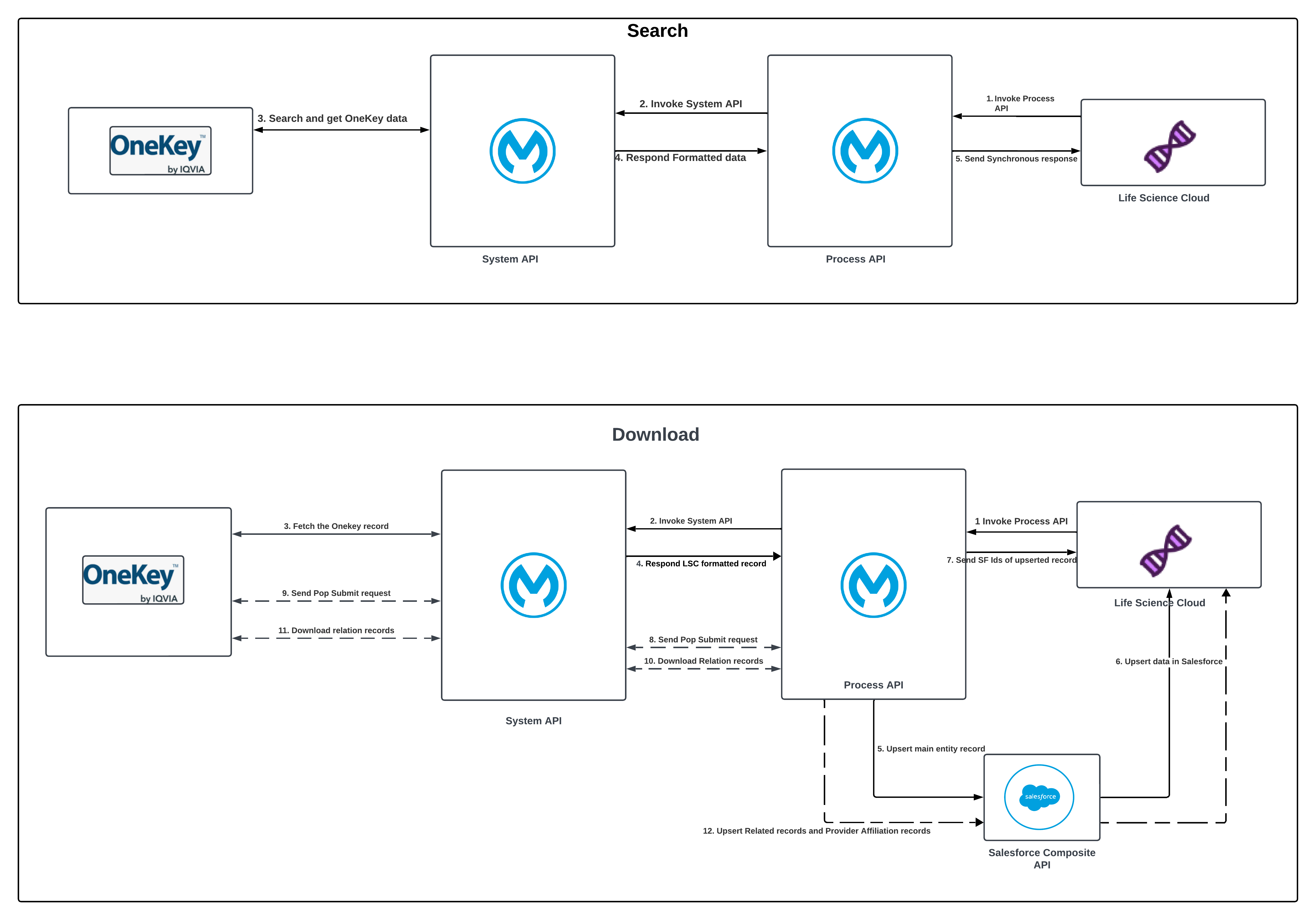
| S. No. | Description - Search |
|---|---|
| 1 | LSC invokes the Process API to search for data in the MDM system. |
| 2 | The Process API validates the request and, if successful, calls the System API. |
| 3 | The System API calls the MDM search endpoint and receives the matching data. |
| 4 | The System API transforms the MDM data into the LSC format and returns it to the Process API. |
| 5 | The Process API returns the search results to LSC. |
| S. No. | Description - Download |
|---|---|
| 1 | LSC invokes the Process API to download main entity records from the MDM system. |
| 2 | Process API validates the request; if successful, it calls the System API. |
| 3 | System API calls the MDM download endpoint and retrieves the selected records. |
| 4 | System API transforms the MDM data into the LSC format and returns it to the Process API. |
| 5 | Process API upserts the main entity record or records synchronously and stores their Salesforce IDs. An Activity download can return the affiliation together with its related provider records. |
| 6 | Process API returns the main entity ID or IDs to LSC and starts asynchronous contract and relation processing. |
| 7 | If the selected result is out of contract, Process API asks the System API to add it to the contract population, and the System API forwards the request to MDM. This call is skipped when the result is already in contract. |
| 8 | Process API asks the System API to download immediate and multi-level relation records. |
| 9 | System API downloads and transforms the relation records and returns them to the Process API. |
| 10 | Process API upserts the related entities, affiliations, and workplace hierarchy records into LSC. |
Data Change Request (DCR)
DCR uses two schedulers to move records through submission and monitoring. Both schedulers run with disallowConcurrentExecution="true", so a job never overlaps a previous run of itself.
Jobs
| Job | Trigger | Purpose |
|---|---|---|
| DCR Submission Job | Fixed frequency ${dcr.submit.schedulerFrequencyInMin} minutes (30 by default) | Picks up Qualified records, enriches and submits them to OneKey through the System API, and marks successful submissions Processed. |
| DCR Monitoring Job | Fixed frequency ${dcr.trace.schedulerFrequencyInMin} minutes (30 by default) | Picks up Processed records, retrieves their outcome from OneKey, and writes the result back to Life Sciences Cloud. |
The Process API calls the OneKey System API over /dataChange/submit and /dataChange/status, under the configured /onekey-sys/v1 base path.
Job Execution Statuses
A Data Change Request moves through these statuses on LifeSciDataChangeRequest. The jobs select records by status, and the values are configured under dcr.status in config.yaml.
| Status | Meaning |
|---|---|
| Qualified | The record is ready to submit and hasn't been sent to OneKey. The Submission Job selects records in this state. |
| Processed | The record was submitted and is awaiting a decision. The Monitoring Job selects records in this state. |
| Approved | OneKey approved the request; its status resolved to VAS_FOUND. |
| Rejected | OneKey rejected the request or returned a decision that is neither approved nor pending. |
| Failed | Submission failed or no matching OneKey result was found, for example because of an unsupported entity, missing mandatory field, or non-activity affiliation. |
High Level Diagram
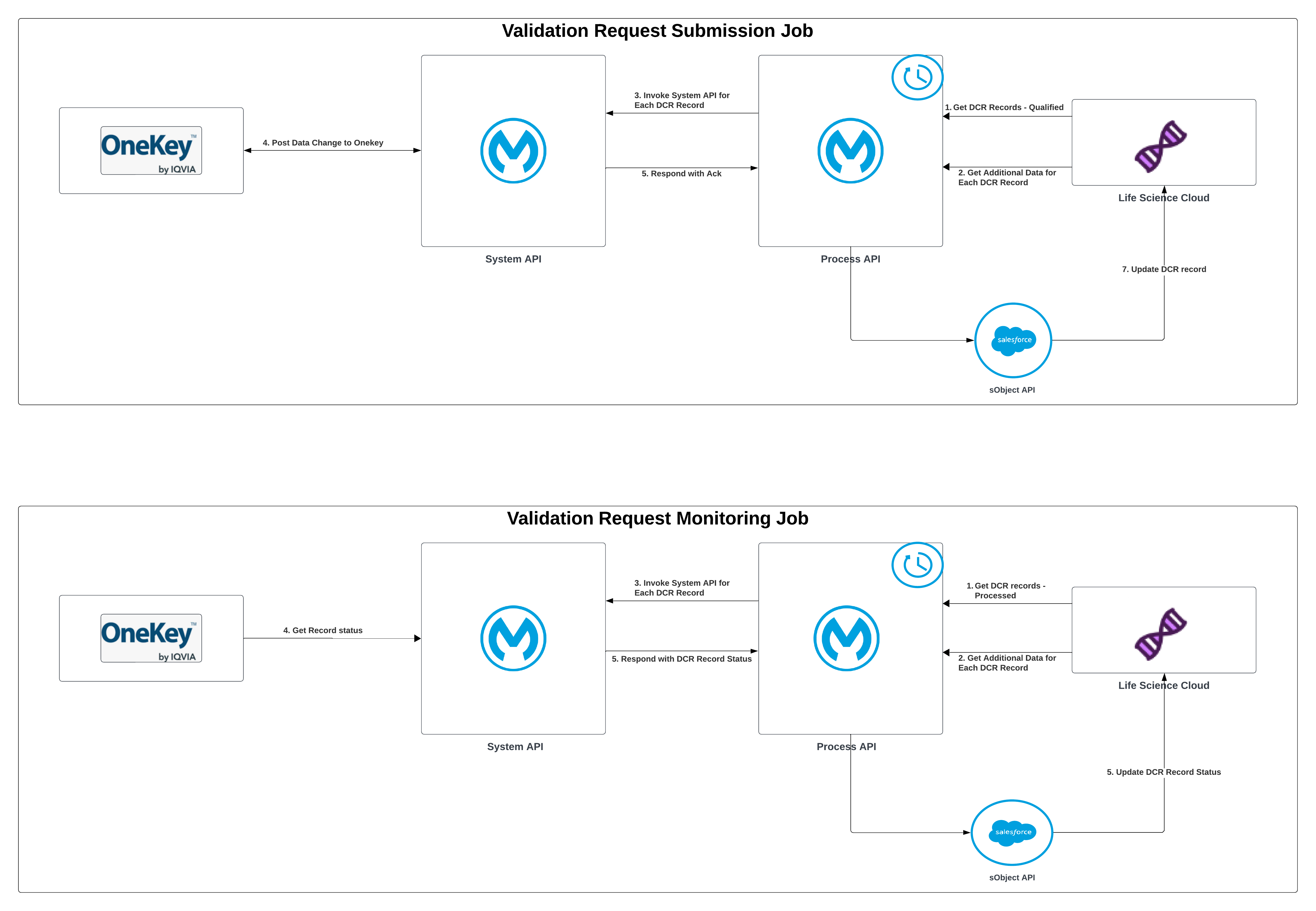
Unlike Search Before Create, DCR is job-based: two schedulers move records through the lifecycle without any inbound API call. The Submission Job pushes changes to OneKey; the Monitoring Job brings the decision back.
| S. No. | Description - DCR Submission Job |
|---|---|
| 1 | The Process API scheduler selects Qualified records from the LSC Data Change Request entity. |
| 2 | Process API enriches each request with the Account, ContactPointAddress, and other mandatory MDM data. |
| 3 | System API maps the LSC request to the MDM format and validates its entity and mandatory fields. |
| 4 | System API submits the valid request to MDM and receives the processing acknowledgment. |
| 5 | System API returns the acknowledgment and external request identifier to the Process API. |
| 6 | Process API writes the submission status and identifier to the LSC Data Change Request record. |
| S. No. | Description - DCR Monitoring Job |
|---|---|
| 1 | The Process API scheduler selects Processed records from the LSC Data Change Request entity. |
| 2 | Process API resolves the country and external request identifiers required to trace each record. |
| 3 | System API maps and groups the status requests by country. |
| 4 | System API calls MDM and receives the pending, approved, or rejected outcome. |
| 5 | System API maps the MDM outcome and returns it to the Process API. |
| 6 | Process API writes the resolved status and response to the parent and child Data Change Request records. |
DCR Submission Job (Detailed)
The Submission Job is implemented in dcr-submit-impl.xml. It runs on the main_dcr-submit-job-flow scheduler, which first initializes logging context and retrieves a Salesforce token, then calls the implementation subflow.
| S. No. | Description |
|---|---|
| 1 | The job counts the Qualified parent DCRs with getDCRSubmitCount (records where status = 'Qualified', externalvalidationsysname = 'OneKey', validationtype = 'External', parentdatachangerequestid = null, and extlvalidationreqidentifier = null). If the count is zero, the job logs "no records to process" and ends. |
| 2 | For each parent record (processed oldest-first, one at a time, ordered by CreatedDate), the job fetches the parent DCR, its child DCRs, and related entity details through a single Salesforce Composite API request. The composite request returns childRecords, entityType, contactPointAddress, healthcareProvider, and account. |
| 3 | The job creates one primary request containing all child records other than additional addresses and affiliations, including the first ContactPointAddress and first ProviderAffiliation. Each additional address or affiliation becomes a separate request, and HealthcareProviderSpecialty records are included in the primary request and appended to each additional request (splitResponse.dwl). The job then detects whether each request carries an affiliation, a specialty, both, or no child records. |
| 4 | The Process API enriches the request on the matching branch: both (affiliation + specialty), affiliation only, specialty only, or no child records. Enrichment issues further composite reads for the related account, main affiliation, and care specialty so the request carries the fields OneKey needs. The request entityType is resolved independently from the Account record type: IsPersonType = true produces activity; otherwise, it produces workplace. |
| 5 | The Process API builds the System API request (submitSAPIRequest.dwl), carrying requestId, countryCode, comment, operation, entityType, and entityData. Affiliation eligibility is a separate check: an affiliation is eligible only when its AffiliationType matches dcr.activityAffiliationType (Hard). Before calling out, checkInvalidRelation.dwl short-circuits a request containing an ineligible affiliation and sets a failed response locally without calling OneKey. |
| 6 | The Process API submits the request to the System API at /dataChange/submit. The System API maps and validates it (see the Mappings guide) and calls OneKey. A validation or bad-request failure is caught and captured as the record's response rather than aborting the job. |
| 7 | The Process API writes the outcome back to the DCR record through the Salesforce sObject Collections API (PATCH). A successful submission sets Processed and the returned OneKey request identifier; a submission failure sets Failed and failureReason (submitResponse.dwl). |
DCR Monitoring Job (Detailed)
The Monitoring Job is implemented in dcr-trace-impl.xml. It runs on the main_dcr-trace-job-flow scheduler with the same initialize-and-token preamble as the Submission Job.
| S. No. | Description |
|---|---|
| 1 | Count the Processed parent DCRs with getDCRTraceCount (records where status = 'Processed', externalvalidationsysname = 'OneKey', validationtype = 'External', and parentdatachangerequestid = null). |
| 2 | Process the records in batches of dcr.trace.recordLimit (100 by default), oldest-first. For each batch, fetch the trace records (their ExtlValidationReqIdentifier, entity object name, and DataChangeInformation). |
| 3 | Determine the country for each record from its related ContactPointAddress through a composite read, and group the records by country. If the country can't be determined, the record surfaces the "Could not determine country code" error. |
| 4 | Send each country group to the System API at /dataChange/status. The System API groups by country in a parallel-for-each, calls OneKey's trace endpoint, and maps the latest matching result to a status: VAS_FOUND → Approved, an empty requestStatus → Processed (pending), and any other nonempty status → Rejected; a request with no matching OneKey result → Failed. |
| 5 | For each non-pending result, look up the child DCR record IDs and write the resolved status and returned OneKey identifiers to the parent and child DCR records through the Salesforce sObject Collections API. Pending results are filtered out, so their existing Processed status remains unchanged and they are selected again by a later Monitoring run (see Write-Back to Salesforce). |
Write-Back to Salesforce
Both DCR jobs write their outcome back to the LifeSciDataChangeRequest record (the parent and any child records) through the Salesforce sObject Collections API (PATCH). The fields written differ by job:
| Job | Field written | When | Value |
|---|---|---|---|
| Submission | status | Always | Processed on success, Failed on a submit failure |
| Submission | ExtlValidationReqIdentifier | Non-failed records | The OneKey request identifier returned on submit (cegedimRequestEid) |
| Submission | failureReason | Failed records | The failure detail, for example an unsupported entity or a missing mandatory field |
| Monitoring | status | Non-pending results | Approved, Rejected, or Failed. Pending results aren't written and remain Processed. |
| Monitoring | extlvalidationsysresponse | Approved or rejected records with a nonempty response | The OneKey response comment |
| Monitoring | failureReason | Failed records | The failure detail |
| Monitoring | DataChgExtlRecIdentifier | Non-failed records, by entity | The validated OneKey ID: Account to the individual or workplace ID, ContactPointAddress to the address ID, ProviderAffiliation to the affiliation ID |
The corrected OneKey data itself is not returned on the Monitoring response. Approved changes flow back into Life Sciences Cloud later through the Provider Bulk Sync Delta Job (see the FAQs).